Build a Claims Adjudicator You Can Actually Audit
Part two: from install.sh to a running workflow, in one sitting
The first article made an argument: control over an AI system lives in the paths it can take, not in the orders you give it. Arguments are cheap. This one builds the thing.
We are going to adjudicate a surgical claim for a fictional insurer, StoneInsurance. A patient has had surgery, the hospital has invoiced, and the claim has to be assessed against the patient's policy and either paid, adjusted, or declined — with a record at the end that survives someone asking why.
By the end you will have a workflow that retrieves a policy, pulls the coverage clauses that apply, judges each invoice line with a model, calculates money without a model anywhere near the arithmetic, applies a deterministic policy gate, and parks on a human when it should. Roughly forty minutes, most of it spent understanding rather than typing.
Install
Docker and the Compose v2 plugin are the only prerequisites.
curl -fsSL https://raw.githubusercontent.com/FloMorphic/getting-started/main/install.sh | bash
It asks five things, all with sane defaults you can hold Enter through: the
install directory, whether to install a new platform or point at one you
already run, the fractal's tags and container name, and — behind an advanced
prompt — the two host ports. Every one of them can be set with an environment
variable instead, and ASSUME_YES=1 runs the whole thing unattended.
If you don't already have a platform, the FloMorphic installer delegates that part to the Inflowenger installer rather than duplicating it, which is why the run below asks about fractals in the middle:
$ curl -fsSL https://raw.githubusercontent.com/FloMorphic/getting-started/main/install.sh | bash

==> Checking prerequisites
    ✓ docker + compose available (docker compose); downloader: curl

  FloMorphic installer
  canvas + API + builtin plugin nodes, on the Inflowenger runtime

==> Configuration
Install directory [~/flomorphic]:
    No running Infra found. FloMorphic needs the Inflowenger platform (Infra + a Fractal).
Install a new platform now? [Y/n]

==> Installing the Inflowenger platform (Infra + Fractal)
    Delegated to the Inflowenger installer so the platform stack has one source of truth:
      https://raw.githubusercontent.com/Inflowenger/getting-started/main/install.sh
Fractal tags (comma-separated) [default]:
Fractal container name [fractal-1]:

==> Starting the platform (Infra + Fractal)
[+] up 2/2
 ✔ Container inflow-infra  Healthy      4.7s
 ✔ Container fractal-1     Started      4.8s
    Waiting for Infra to become ready...
    ✓ Infra is up (http://localhost:8022)

Set advanced options (ports)? [y/N] y
Host port for the canvas [8088]:
Host port for the API [8026]:

==> Writing the FloMorphic stack -> ~/flomorphic/flomorphic
    ✓ flomorphic/docker-compose.yml + .env written

==> Starting FloMorphic
    the published image is fully baked (api, canvas AND plugin nodes compiled
    in per-arch), so it starts fast — nothing is cloned or built at run time.
[+] up 1/1
 ✔ Container flomorphic  Started        0.1s
    Waiting for the canvas to answer on http://localhost:8088 ...
    ✓ FloMorphic is up

==> Done

  FloMorphic
    Canvas               http://localhost:8088
    API (direct)         http://localhost:8026   (the canvas uses /api behind the canvas port)
    Plugin nodes         baked into the image per-arch, started inside the container

  Platform
    Infra portal         http://localhost:8022
    NATS HTTP monitor    http://localhost:8222
    Fractal              fractal-1  (tags: default)

  API Secret Key  (save this — it is your admin credential)
    ••••••••••••••••••••••••••••••••••••••••••••••••••••••••••••••••

  Files & management
    Stacks live in       ~/flomorphic
    Database             ~/flomorphic/flomorphic/data/flomorphic.db
    Follow the boot      (cd ~/flomorphic/flomorphic && docker compose logs -f)
    Stop FloMorphic      (cd ~/flomorphic/flomorphic && docker compose down)
    Update the image     edit FLOMORPHIC_IMAGE in flomorphic/.env, then docker compose pull && docker compose up -d
    Stop the platform    (cd ~/flomorphic/platform && docker compose down)
Under ten seconds, most of it Infra's health check. The published image is fully
baked per-arch, so nothing clones or compiles on first start — if you want to
watch the boot anyway, docker compose logs -f from the flomorphic directory.
Save that secret key; it's your admin credential, and the installer is the only place it's printed in the clear.
Two things to set up before you draw anything
The canvas is not where credentials or storage live. Both are entities beside it, and creating them first means the graph you build in a minute has something to point at.
A provider profile
Node settings holds named configuration profiles bound to a node kind. Create one for the LLM node: pick a provider — OpenAI, Anthropic, Gemini, OpenRouter, or any OpenAI-compatible endpoint including a local Ollama or vLLM — and give it a model and a key.
A canvas node then references this profile by id. The consequence is worth pausing on: credentials never live on the graph. You can export a flow, hand it to a colleague, commit it, or paste it into an article, and the key stays behind. One profile per environment is the pattern — staging points at a cheap model, production at the real one, and the flow doesn't change.
Two memory stores
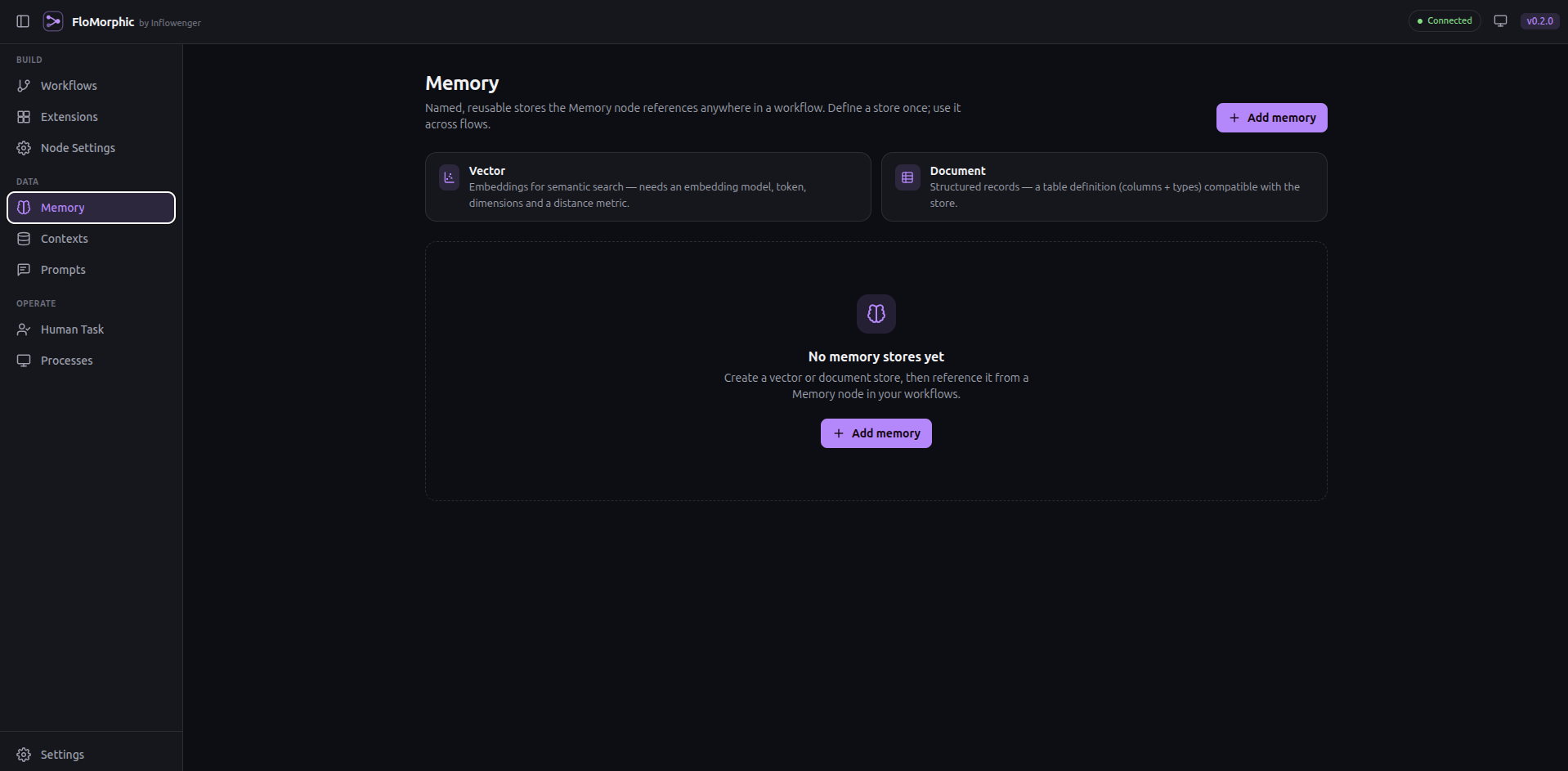
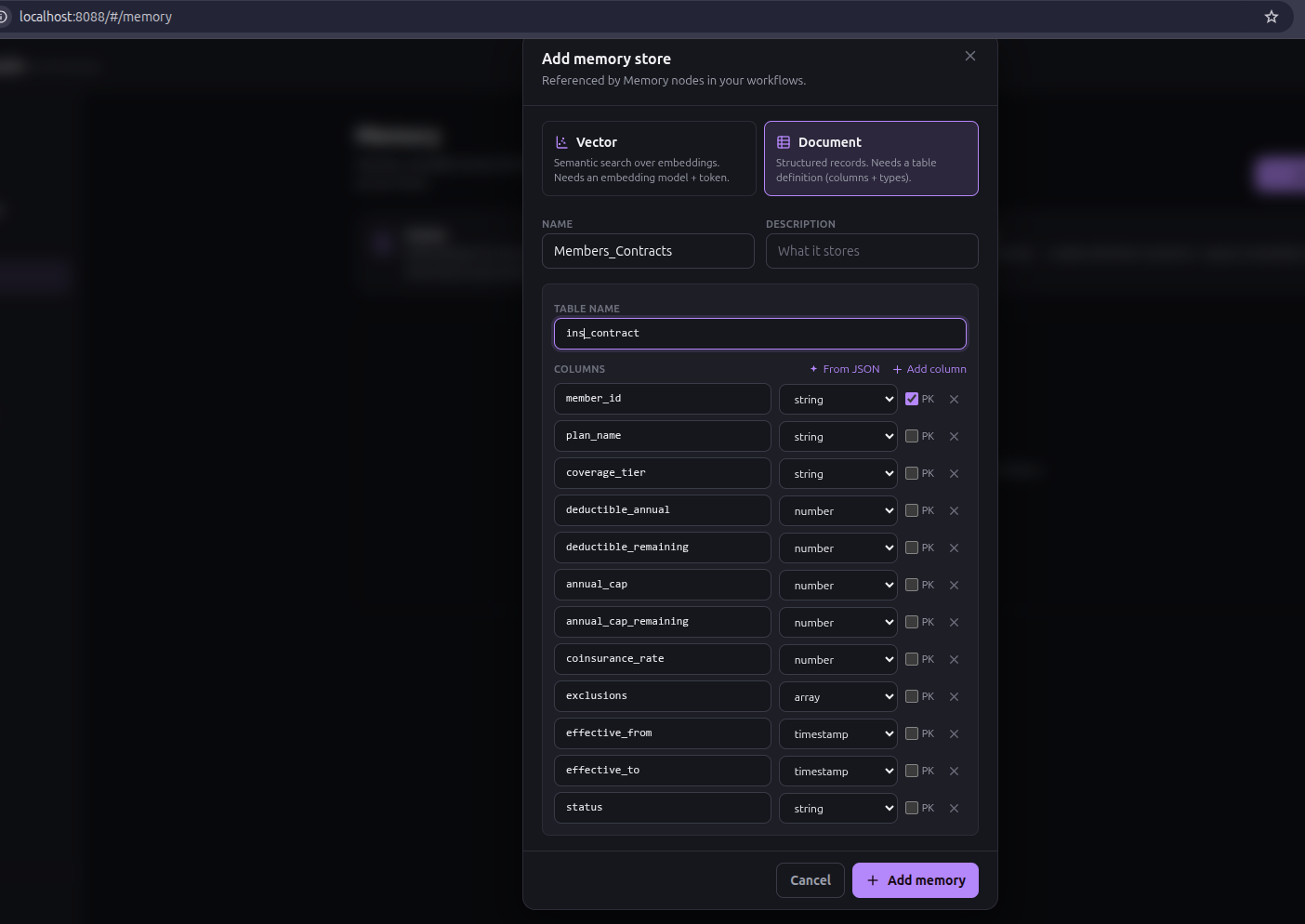
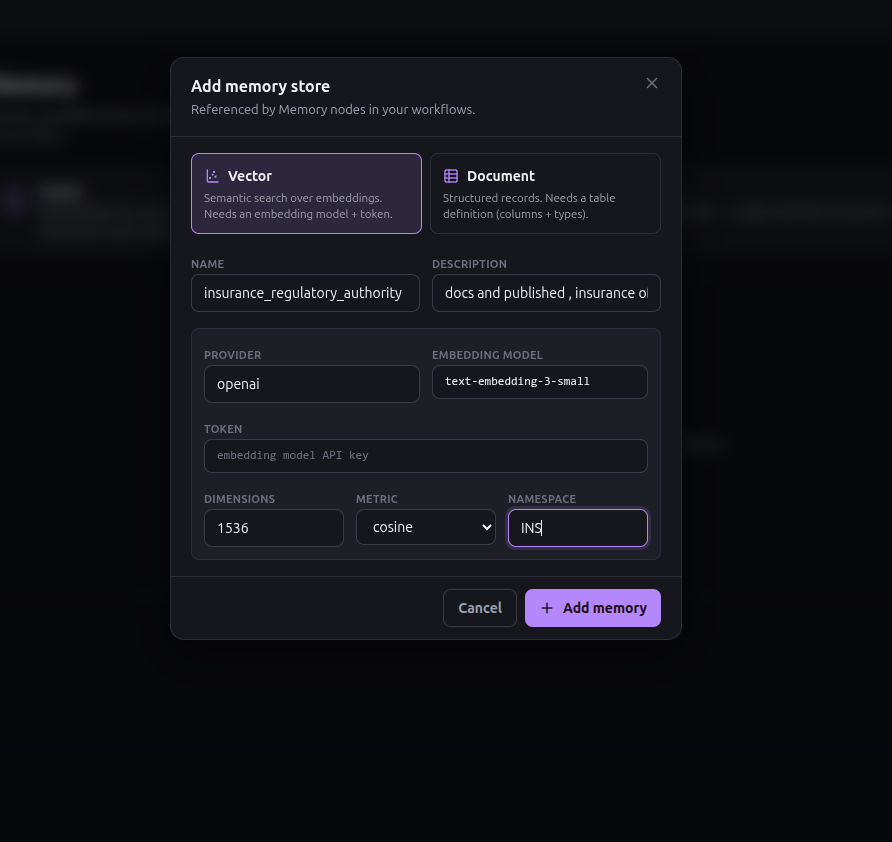
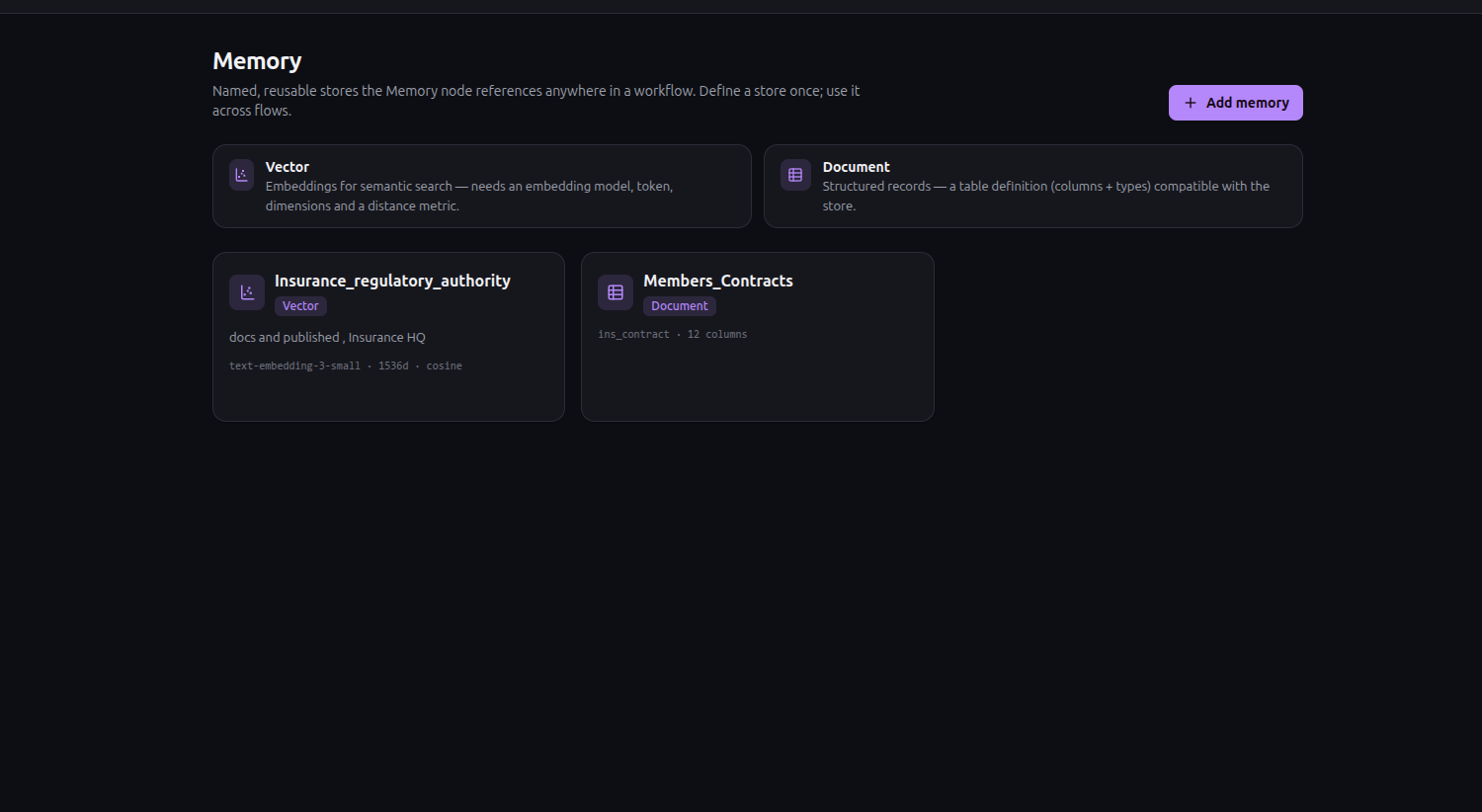
Under Memory, create:
stone_policies— a Document store. It declares a table and its columns, and holds structured records you can query with SQL. This is where the patient's contract lives: coverage tier, deductible, annual cap, co-insurance rate, exclusions.clinical_guidelines— a Vector store. It declares an embedding model, its dimensions, and a distance metric; creating one provisions a real vector index sized to it. This is where the coverage rules and medical-necessity criteria go, so we can retrieve the clauses relevant to these procedures rather than stuffing the entire policy handbook into a prompt.
Both are resolved server-side by id when a node calls them, which means a request never gets to choose which table it touches. That's a small detail with a large security consequence, and it's the reason store selection is a drawer setting rather than a field a model can fill.
 Long-term memory is an entity, not a library call.
Draw it with AI Build
Now the part that saves you an hour of learning a palette before you can use it — and the part this whole walkthrough is really recommending. If you take one habit away, make it this: start every workflow in AI Build. It is not a shortcut around the design work; it is where the design work happens. Every consideration that matters — which store a node may touch, where a model's discretion ends and code begins, even how you want an invoice's lines iterated — is something you state in words here and read back before a single node exists.
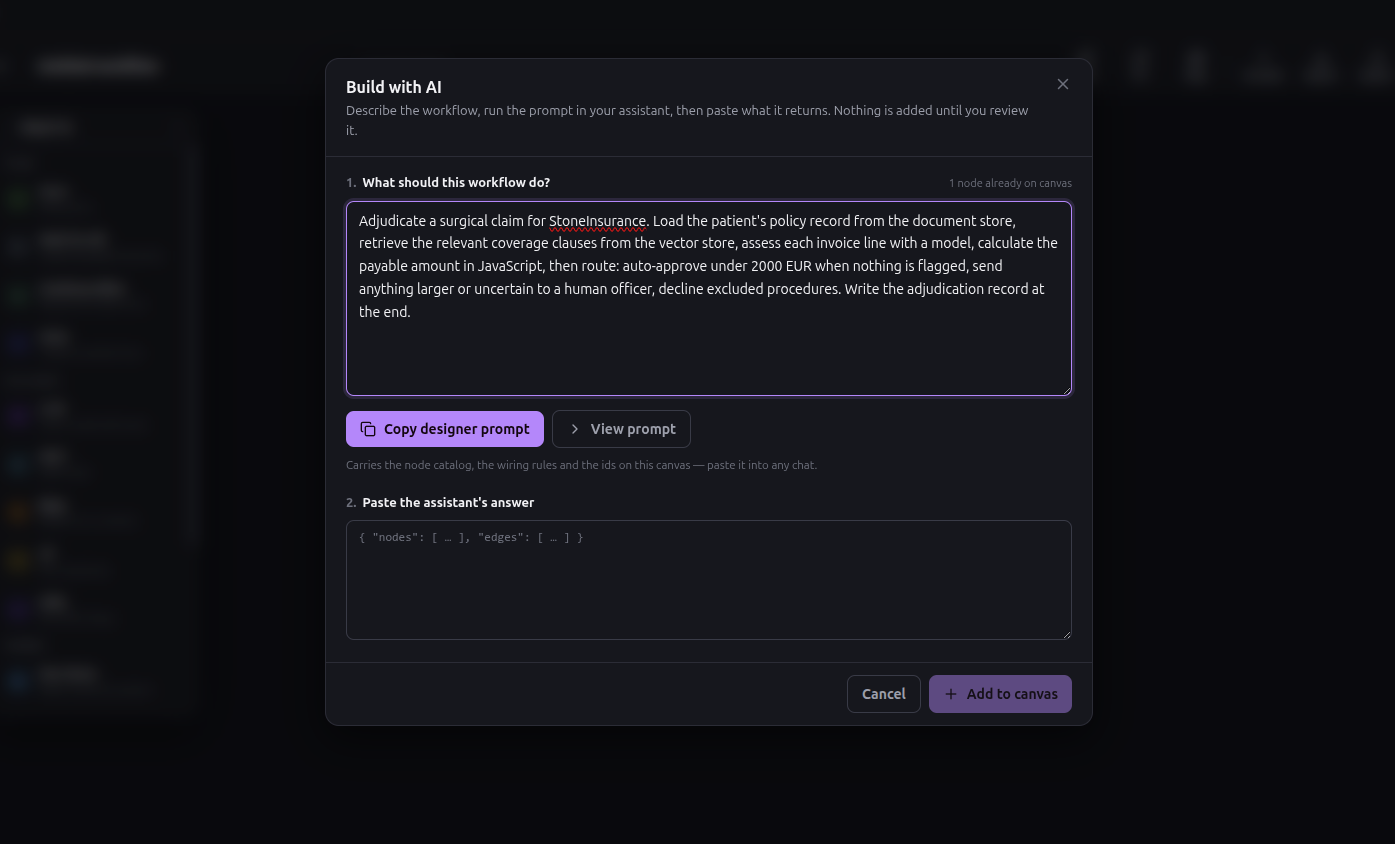
AI Build is a prompt builder. You type what you want; it generates the instructions an assistant needs to emit a valid workflow for your install. That prompt is not hand-written boilerplate — it is derived from the node catalog itself, so it carries every node kind, the exact data fields each one takes with their defaults, the port rules, any plugins registered in your install, and a list of the nodes already on your canvas with their real ids.
Two consequences. The prompt can never drift from the catalog as it grows. And because it describes the canvas you already have, what comes back is a patch — nodes and wiring to add — not a replacement graph. AI Build is as useful on turn five as on turn one.
Type the goal:
Adjudicate a surgical claim for StoneInsurance. Load the patient's policy record from the document store, retrieve the relevant coverage clauses from the vector store, assess each invoice line with a model, calculate the payable amount in JavaScript, then route: auto-approve under 2000 EUR when nothing is flagged, send anything larger or uncertain to a human officer, decline excluded procedures. Write the adjudication record at the end.
Copy the generated prompt, paste it into whatever assistant you already pay for, and paste the JSON it returns back into FloMorphic. No API key required for this step, no provider lock-in, and it works with a chat window you already have open.
What comes back looks like this:
{
  "nodes": [
    { "ref": "load_policy", "kind": "docstore", "title": "Load Policy Record",
      "key": "policy", "scope": "$",
      "data": { "action": "read",
                "query": "select * from <STORE_NAME> where policy_id = <value>" },
      "note": "Designer completes the store and query in the drawer." },
    { "ref": "load_clauses", "kind": "vecstore", "title": "Retrieve Coverage Clauses",
      "key": "coverageClauses", "scope": "$",
      "data": { "action": "read", "query": "{{$.claim.summary}}" } }
  ],
  "edges": [
    { "from": "start", "to": "load_policy" },
    { "from": "start", "to": "load_clauses" }
  ],
  "notes": ["Select the document and vector stores in the drawer."]
}
ref is a local name the patch's edges use; real canvas ids are assigned on import. The parser tolerates a code fence, prose before or after the object, or a bare object — so you can paste the assistant's whole reply without cleaning it up.
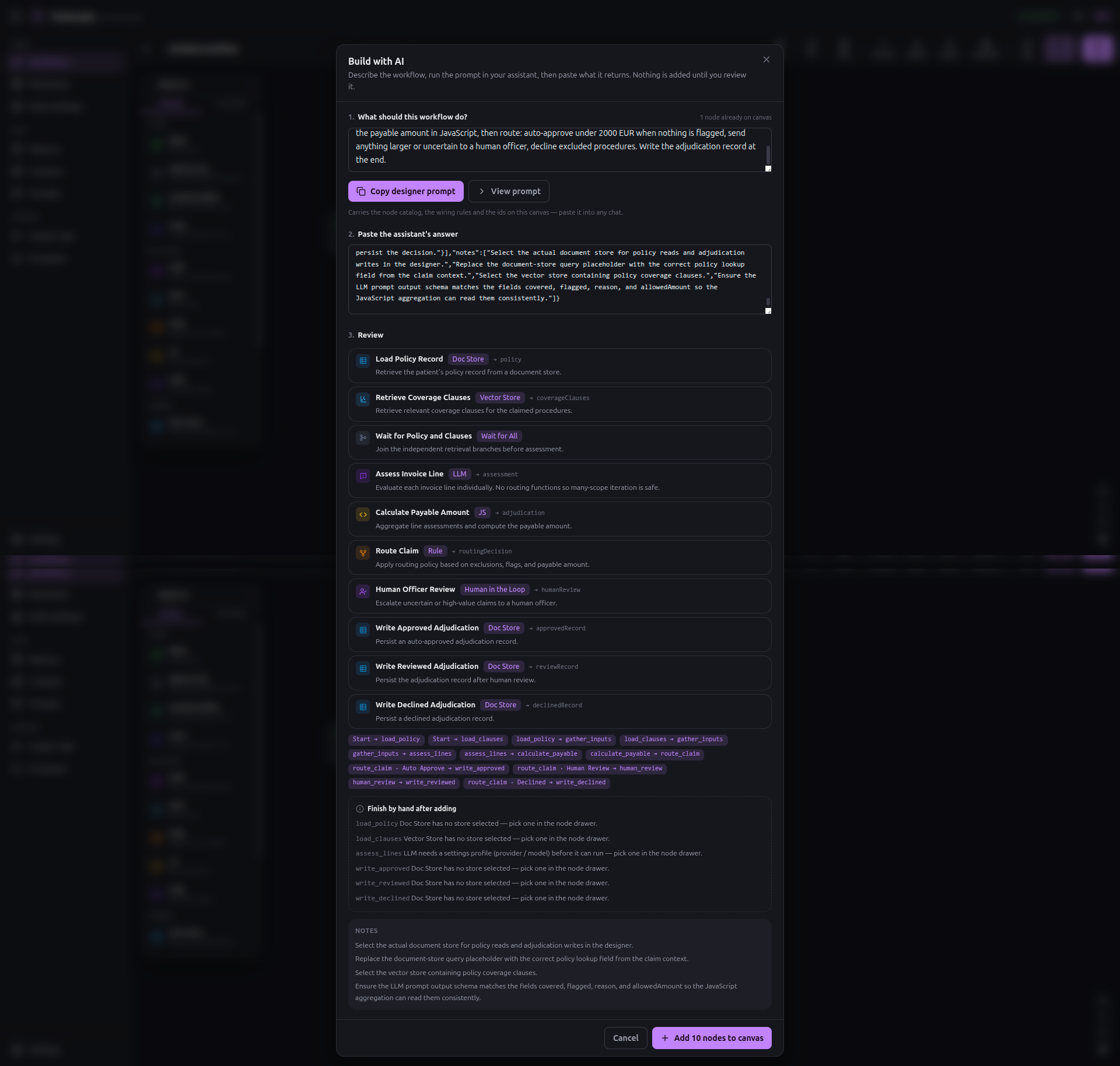 The prompt is generated from the node catalog, so it can't go stale.
Read the review list. This is the whole point.
Nothing touches the graph yet.
The patch is planned first: kinds are validated against the catalog, data is merged over each kind's defaults, invented refs are remapped to canvas ids, named ports are resolved to real handles, positions are laid out — and every problem is reported for you to read before anything is applied.
Errors drop the offending node or edge. Warnings apply as-is but tell you what will bite. This patch's list has two registers. The hard ones — things the planner flags because a node cannot run as-is:
- "Load Policy Record has no store selected — pick one in the node drawer."
- "Retrieve Coverage Clauses has no store selected — pick one in the node drawer."
- "Assess Invoice Lines needs a settings profile (provider / model) before it can run."
- "Each of the three write nodes has no store selected."
And softer design notes the assistant leaves behind — the one that repays reading here is "ensure the LLM assessment output matches the fields the JavaScript aggregation reads." That is a coupling no schema can enforce for you: the model is asked for payable_amount, covered, excluded, confidence, and flags, and a js node three steps away reads exactly those names. Nothing breaks loudly if they drift; the totals just come out wrong. The note names the seam before you run into it.
The planner also performs genuinely semantic checks when they apply — a second Start node, or a bound function with no name whose port would carry no route tag and leave everything downstream unreachable at run time. This graph tripped none of them, but that is the class of mistake the system is built to name before you can make it.
This is what a generated artifact looks like when the artifact is inspectable. The model proposed a graph. You are reading its proposal, with the problems listed, before a single node exists. Compare that to a generated agent that is already running by the time you learn what it decided to do.
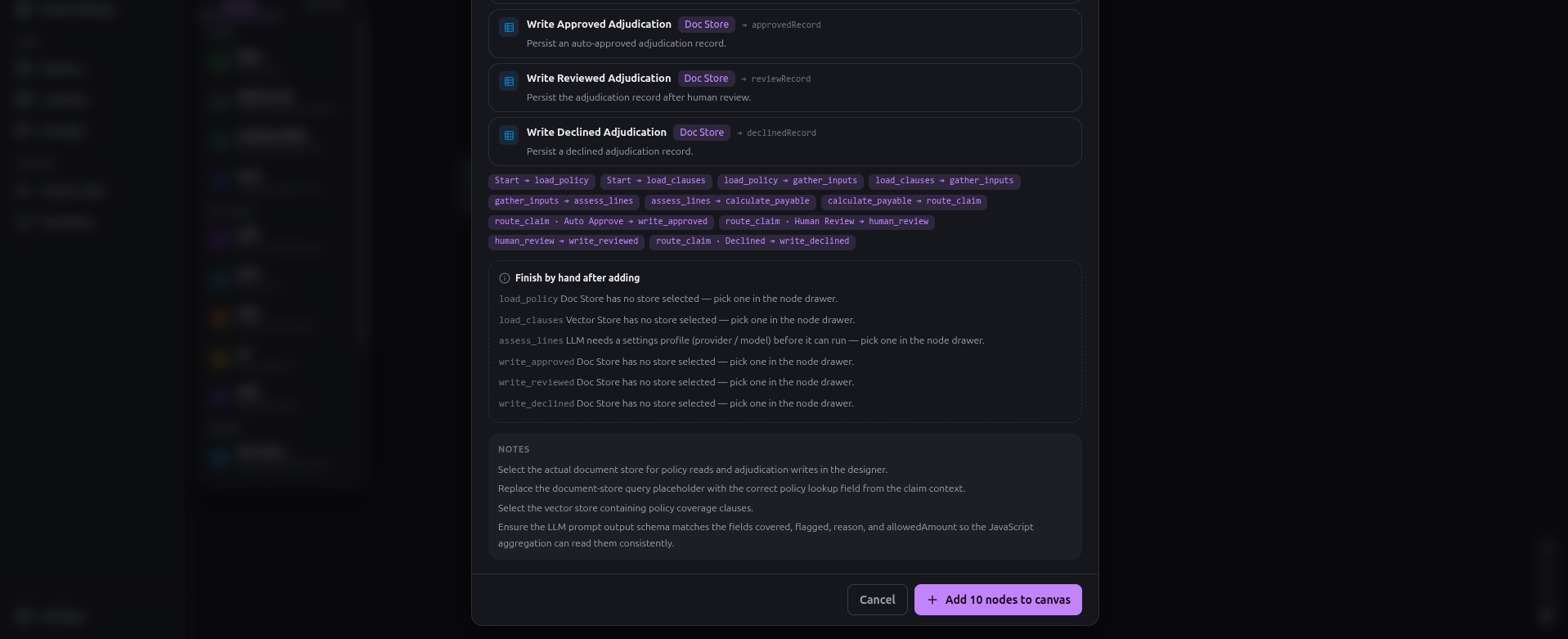
The model proposed. Nothing has run yet.
Accept it, and the nodes land on the canvas.

Fill in the drawers
AI Build got you the shape. The parts it deliberately left blank are the parts it should not guess.
The store nodes. There are five: Load Policy Record, Retrieve Coverage Clauses, and the three write nodes at the ends of the branches. Pick stone_policies on the document reads and writes, clinical_guidelines on the retrieval. Then finish the SQL, which arrived as the placeholder the review list flagged:
select * from stone_policies where policy_id = '{{$.claim.policyId}}'
That {{$.path}} substitution is the single most important mechanic in FloMorphic, and it works in every text field in the product — SQL, prompts, HTTP URLs, headers, request bodies, and the human-in-the-loop prompt. It is what makes the run's Context feel like one live document that every node reads and writes, rather than plumbing you thread between steps. A second form, {{$this}}, resolves to whatever a node's scope is currently pointed at — you will see it earn its keep on the assessment node in a moment.
On the vector node, the query is the text to match by similarity — so {{$.claim.summary}} retrieves the clauses relevant to this claim, not the whole handbook.
The assessment node. This is where the model's discretion lives, and it is narrower than you might expect. The node has no bound functions, and therefore no output ports. Its job is to look at one invoice line and emit a structured verdict — not to route. It is seeded with two messages:
System: You are a surgical claims adjudication assistant. Assess the
scoped invoice line against the policy and coverage clauses available
in context. Return structured findings including covered, excluded,
payable_amount, confidence, and flags.

User:   Invoice line: {{$this}}
        Policy: {{$.policy}}
        Coverage clauses: {{$.coverageClauses}}
Notice the two kinds of reach. {{$this}} is the single line this pass is scoped to; {{$.policy}} and {{$.coverageClauses}} climb back to the whole context for the shared inputs the two reads deposited there. And the model returns data, not a decision — an object like { "covered": true, "excluded": false, "payable_amount": 680, "confidence": 0.91, "flags": [] }, written back onto that line under assessment. Nothing branches here. Routing happens later, in a Rule node, on numbers the model produced but does not get to act on.
That is a deliberate choice over the alternative. You could bind functions to this node and let the model pick a port per line — and if you want hard schema enforcement, that is how you get it, at the cost of an _exception port you then have to wire for the pass where the model picks nothing. Here the model's output stays plain data all the way to a deterministic gate, which is easier to re-derive and audit. Both are legitimate, and which one you get is — again — a sentence in the AI Build goal. The generated graph took the data path.
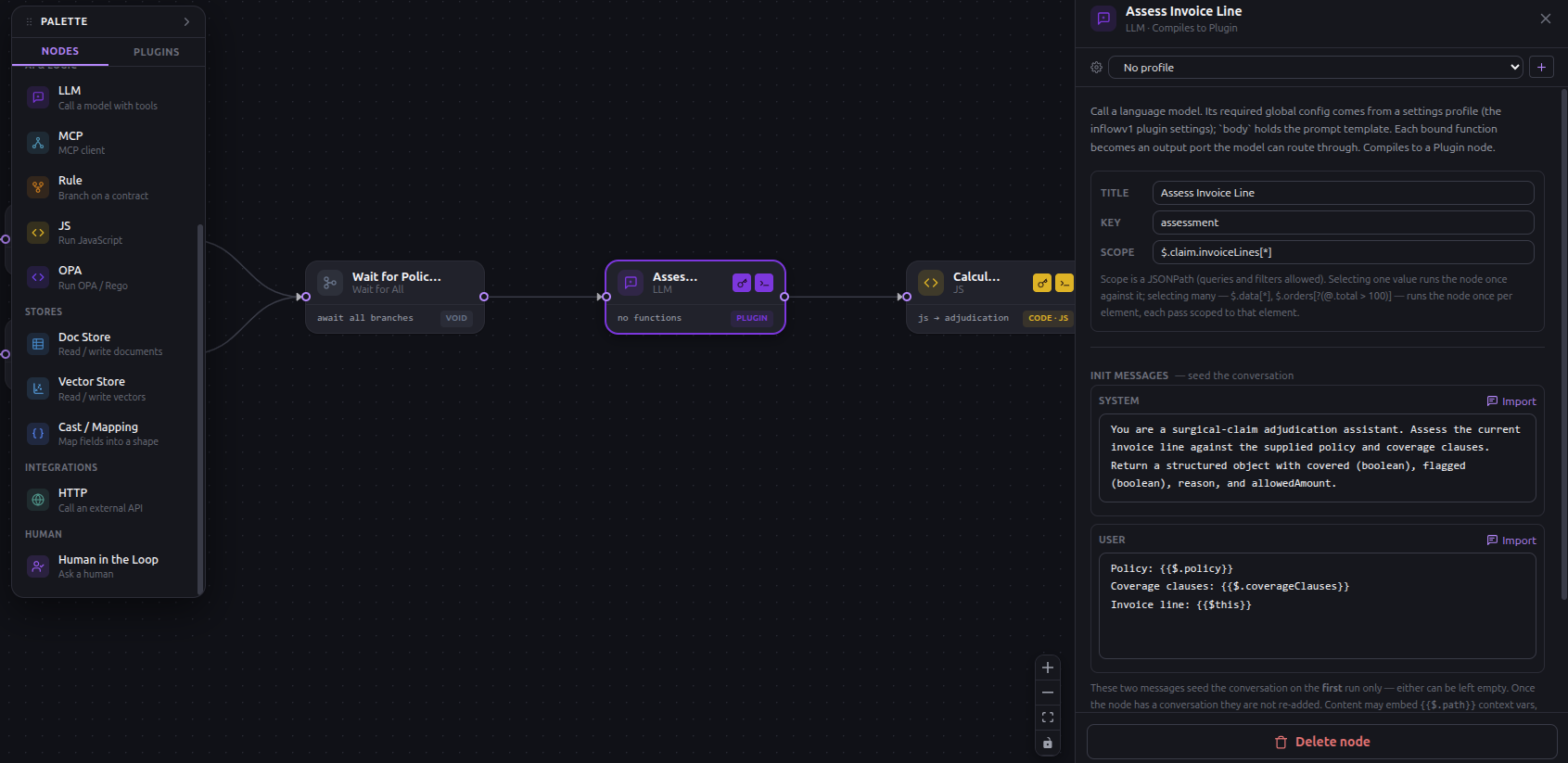 The model returns findings per line. It does not route.
The loop — automatic, or drawn on request
An invoice has many lines, and each needs its own judgment. How that iteration is expressed is a design decision — and like every design decision in this build, you make it in the goal you hand AI Build, not by wiring nodes.
What this goal produced: automatic iteration. scope is a full JSONPath, and its cardinality decides how many times a node runs. Point a node at a single value and it runs once against it. Point it at a multi-result path — $.claim.invoiceLines[*] — and the runtime runs it once per element, each pass scoped to that one element. No loop node, no counter. The assessment node is scoped exactly this way, which is why it sees only {{$this}} on each pass and writes one verdict per line. The per-line isolation is a property of the path.
Contrast the node right after it. The aggregation is scoped to $ — the whole context — because it has to total every line at once, so it runs exactly once. Same mechanic, opposite cardinality, one JSONPath of difference.
Upstream sits the other half of the topology the generator drew. Start fans out to both reads at once — policy from the document store, clauses from the vector store — because neither depends on the other, and they rejoin at a Wait for All node (promissall) whose only job is to hold the assessment back until both reads have landed on the context. Parallel where the work is independent, a barrier where the next step needs everything — both explicit on the diagram.
What you'd write to draw the loop by hand. Automatic iteration is terse, but every pass is implicit. If you want each line to be a visible, separate step on the canvas — a pop, an assessment, a push, a loop-back — you do not reach for a palette. You say so in the goal ("iterate the invoice lines with an explicit loop: pop each line, assess it, push the verdict, repeat until none remain"), and AI Build blueprints exactly that:
take next line   JS   · shift invoiceLines → claim.current
      ↓
assess line      LLM  · scope $.claim.current
      ↓
record result    JS   · push the verdict into claim.assessed[]
      ↓
more lines?      Rule · handlers: next ↺ back to take next line
      ↓ done                        done → calculate payable
Same adjudication, more nodes and more edges — and every pass becomes its own row in the trace, each pop and push a node you can inspect, retry, or gate. Some teams prefer it for exactly that reason: nothing about the iteration is left implicit. Neither shape was earned by learning the canvas. You described the behaviour you wanted — terse or fully drawn — and the blueprint reflected it.
Money is not a model's job
Each line now carries a verdict. Something has to turn a pile of verdicts into an amount and a set of routing signals, and that something is not a language model.
A model that outputs 12,480.50 is unauditable. You cannot reproduce it, you cannot explain it to a regulator, and it will occasionally be wrong in ways no output validator catches. So the arithmetic is a js node, scoped to $ so it sees every line at once.
FloMorphic's evaluation model is worth getting right, because it is not the one you expect. The scoped slice arrives as input. There is no ctx, no arguments, no function wrapper. The value of the last expression is the node's output — you do not write return.
let lines = input.claim.invoiceLines || []
let totalPayable = 0
let hasExcluded = false
let hasUncertain = false
for (let line of lines) {
  let a = line.assessment || {}
  totalPayable += Number(a.payable_amount || 0)
  if (a.covered === false || a.excluded === true) hasExcluded = true
  if ((a.confidence !== undefined && a.confidence < 0.8) ||
      (a.flags && a.flags.length > 0)) hasUncertain = true
}
let result = { totalPayable, hasExcluded, hasUncertain }
result
Two of those three outputs are not money at all. hasExcluded and hasUncertain are the signals the gate will route on — an excluded procedure anywhere, or any line the model was less than 0.8 sure of or flagged. The code reads the model's findings; it does not re-run its judgment. And it ends by naming result rather than returning it. If the assistant that generated your patch ended this in return — and it probably did, because every model reaches for it — the review list already told you: "Code ends in a return statement. There is no function to return from — the value of the last expression is the output." The same check catches a stray ctx.. These are the two mistakes that produce a node that looks perfect in the drawer and emits nothing, and the system names both rather than leaving them to a puzzled first run.
Now the arithmetic is reproducible, reviewable by someone who does not know what an embedding is, and identical on every run.
The gate
A Rule node evaluates JavaScript or a Rego policy against the scoped context and routes by tag. Its handlers are the branches:
let a = input.adjudication || {}
let decision = { decline: false, review: false, approve: false }
if (a.hasExcluded) {
  decision = { decline: true }
} else if (a.totalPayable >= 2000 || a.hasUncertain) {
  decision = { review: true }
} else {
  decision = { approve: true }
}
decision
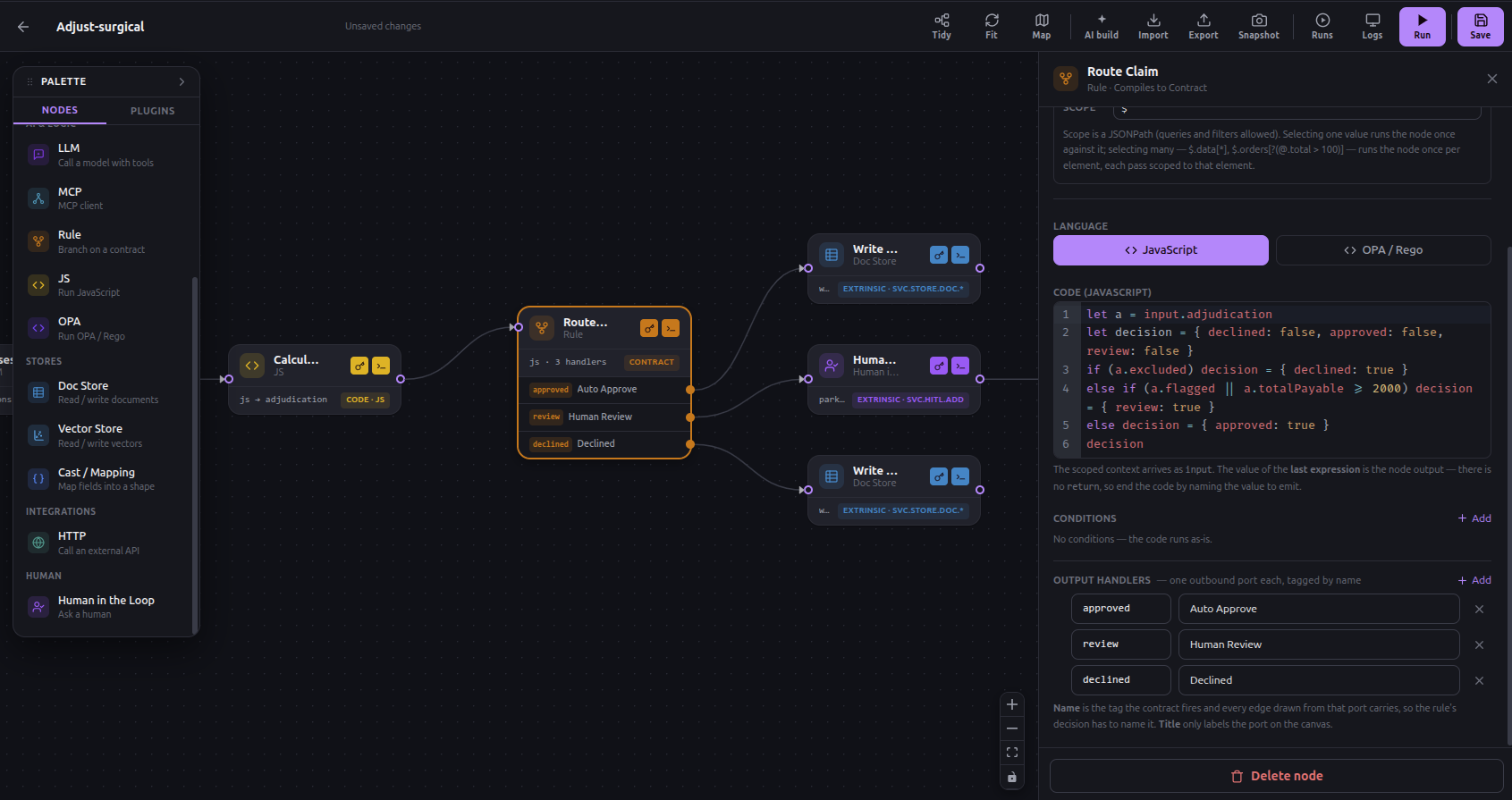
Three handlers named approve, review, and decline (titled Auto Approve, Human Review, Decline on the canvas). The last expression is an object, and the contract fires the port whose name is a truthy key — so { decline: true } takes the decline branch and nothing else. The name is the tag every edge drawn from that port carries; the title only labels it on the canvas. And note what the gate reads: input.adjudication — the code-derived signals only. It never looks at the model's prose. The one place discretion entered the system was the per-line assessment, and by here it has already been reduced to numbers.
Notice what just became editable. That 2000 is a business threshold that will change — quarterly, or the first time the loss ratio moves. Changing it is editing a number in a drawer. Not a pull request, not a deploy, not a release window. And it is visible to the person who actually owns the decision, which is the underwriting lead, not you.
If you would rather write it as real policy, switch lang to opa and put a Rego module in — with input as the scoped slice and the node's conditions available as data. Rego is a policy language with a proof story, not string matching on model output.
Where a human belongs
The review branch goes to a Human in the Loop node, and this node is not what you would guess from the name. It does not hold a static list of questions.
Its prompt tells the session what to establish with the person, and it embeds context variables that the runtime resolves before the task is recorded:
Review adjudication outcome:
{{$.adjudication}}
Policy:
{{$.policy}}
Coverage clauses:
{{$.coverageClauses}}
Determine final disposition and provide rationale.
The officer arrives with the whole picture already assembled — the totalled amount and the flags from the aggregation, the policy, the clauses that were retrieved — and is asked for a disposition and a reason, not for arithmetic. The reason there is no fixed question list is worth stating plainly: a flow reaches a human exactly when what to ask is not yet known. If you could enumerate the questions in advance, you would have written a Rule.
mode is park — the run stops here and resumes when the session closes — or continue, which records the task and carries on. For money leaving the building, park.
The session lives in Human tasks. It opens with the bot's first turn, the officer answers or converses, and closing it resumes the parked run — which then writes the reviewed record, the officer's disposition folded onto the context beside the system's own suggestion. Approval is a state of the process, not a notification sent alongside it.
Run it
A run needs two things: a flow, and a Context to run it against. The Context is the seed — one JSON document that is the working memory of the process, and the thing every node has been reading and writing throughout.
Create one under Contexts with a sample claim:
{
  "claim": {
    "policyId": "SI-448120",
    "currency": "EUR",
    "summary": "laparoscopic cholecystectomy with post-operative CT imaging and a follow-up consultation",
    "invoiceLines": [
      { "code": "47562", "desc": "Laparoscopic cholecystectomy", "amount": 4200.00 },
      { "code": "74177", "desc": "CT abdomen with contrast",     "amount":  680.00 },
      { "code": "99213", "desc": "Follow-up consultation",        "amount":  120.00 }
    ]
  }
}
Hit Run. Every event the engine emits streams to the canvas over a WebSocket and is traced back onto the node or edge that produced it. You watch the two reads run in parallel and join at Wait for All, watch the assessment fire once per invoice line, watch the aggregation total them, watch the Rule pick a branch — live, on the same diagram you drew. (These three lines come to 5000 EUR, over the threshold, so the branch is review.)
Then it stops at the officer session, because that is what park means.
Under Processes you get every run with its status, duration, error, and a jump straight to the context it carried. That list is your audit trail, and it was not a feature anyone added for compliance — it is what an execution engine that persists context naturally produces.
How StoneInsurance would actually run it
Clicking Run is for building. In production the existing claims system starts the flow, and it is two calls.
Create the context:
POST /context
{ "title": "Claim SI-448120", "context": "{ \"claim\": { … } }" }
Then launch the run against it:
POST /process
{ "flowId": "<flow>", "contextId": "<context>" }
scheduledAt in the future records the run as scheduled instead of dispatching it — which is how the overnight batch works without a queue you have to operate beside the system.
And note what did not happen: StoneInsurance's claims system was not rewritten, migrated, or replaced. It POSTs a document and asks for a run. If the flow needs to reach back into their systems mid-process, that is an HTTP node, an MCP node, or an Extrinsic call to a backend that imported the SDK — three general ways outward, rather than a connector catalog that decays with every upstream API change.
What you actually built
Step back and look at what is now true of this system.
Every path it can take is drawn. The model's discretion is a per-line assessment — covered or excluded, an amount, a confidence — and nothing downstream takes it on trust: the money is re-derived in code you can read, and the branch is chosen by a deterministic contract reading those code-derived signals, never the model's prose. The approval threshold is a number a business owner can change without a deploy. The human step is a state of the process, not a side channel. And every run leaves a context document and an event trace that answers why — the question that made the whole thing necessary.
None of that required a runtime feature invented for AI. Eleven canvas nodes, and everything above composes down to the same small set of runtime primitives — and you reached the whole shape by describing it to AI Build, then reading the blueprint back before a node existed.
The reason this matters is not that language models are dangerous. It is that a system nobody can explain cannot be deployed in the places where these decisions actually get made — and that has been the real bottleneck all along. Capability was never the constraint. Legibility was.
Repo: https://github.com/FloMorphic/getting-started
Concepts and docs: https://inflowenger.com/flomorphic
Build something with it and tell me where it fights you. Pre-1.0 means the APIs are still moving, and the feedback that lands hardest is from the first person who tries something I did not anticipate.